Business Systems: The 2026 Guide for Small Business Owners
Business Systems: The 2026 Guide for Small Business Owners

A business system is a structured network of procedures, technologies, and processes designed to deliver consistent, predictable results across your entire organization. It reduces reliance on the owner’s direct involvement and makes growth possible without chaos. If your business depends on you remembering every step, you don’t have a system. You have a habit.
The distinction matters more than most owners realize. A checklist tells someone what to do. A system tells them what to do, who does it, what tools they use, and how you measure success. That combination is what separates businesses that scale from ones that stall.
What are business systems, exactly?
A business system is more than a process. It’s a structured set of components working together toward a defined outcome. SYSTEMology, a recognized industry methodology for small business systemization, describes it this way: a system has a purpose, components, interrelated steps, assigned roles, and measurable results.
Here’s how the layers break down:
- System: The big picture. A collection of processes working toward a shared goal.
- Process: A sequence of steps that make up one part of the system.
- Procedure: The specific instructions or checklist for completing a single step.
- Roles: The positions (not people) responsible for each step.
- Metrics: The numbers that tell you whether the system is working.
The goal of any well-built system is to remove owner dependence. When your business can run a core function without you in the room, that function is systemized. Everything else is still a liability.

Why your business needs solid operational systems
Consistent operations don’t happen by accident. They happen because someone designed a repeatable process and made sure everyone follows it. That’s the core argument for building strong operational systems, and the benefits compound quickly.
- Consistency: Customers get the same experience every time, regardless of who handles their account.
- Scalability: You can onboard new staff and replicate results without retraining from scratch.
- Efficiency: Documented processes reduce errors, cut wasted time, and protect your margins.
- Delegation: When roles are clearly defined, you can hand off work with confidence.
- Owner freedom: With systems running daily operations, you can focus on growth, strategy, or simply stepping back.
Business process automation (BPA) takes this further by using software to automate multi-step, repeatable tasks like invoicing and payroll, freeing your team for higher-value work. But automation only works when the underlying process is already clean. More on that shortly.
Common examples of business systems across every department
Every part of your business runs on systems, whether you’ve designed them intentionally or not. The question is whether yours are documented and repeatable, or locked inside someone’s head.
Here are the core categories and what lives inside each:
- Marketing systems: Lead generation, content creation, email campaigns, paid advertising, referral programs.
- Sales systems: Discovery calls, proposals, follow-up sequences, contract signing, conversion tracking.
- Operations systems: Order fulfillment, quality control, client onboarding, project delivery, logistics.
- Finance systems: Invoicing, collections, payroll, expense tracking, budgeting. Tools like QuickBooks handle much of this automatically when the process is set up correctly.
- HR systems: Job postings, candidate screening, hiring, onboarding, performance reviews, offboarding.
Each of these contains subsystems. Your marketing system, for example, might include a lead generation subsystem built from email campaigns, paid ads, and referral tracking. The more deliberately you map these, the stronger your operational foundation becomes. For a deeper look at how marketing automation fits into this picture, that’s worth exploring separately.

Key building blocks of an effective business system
Knowing what a system is and actually building one that holds up are two different things. Effective systems share a common architecture, regardless of the department or function they serve.
- Clear design: Every system starts with a defined intention. What result does this system produce?
- Documented processes: Steps are written down, not memorized. If it’s not documented, it doesn’t exist as a system.
- Assigned roles: Responsibilities attach to positions, not individuals. This makes the system transferable.
- Centralized storage: Integrated business management eliminates data silos by keeping everything in one accessible place, enabling real-time decisions.
- Measurable metrics: Every system needs a way to track whether it’s working.
SYSTEMology’s seven-stage framework gives this structure a practical sequence:
- Define your critical processes.
- Assign a team member to capture them.
- Extract the knowledge from the person doing the work.
- Organize everything in a central hub.
- Integrate by training your team.
- Scale the approach across other functions.
- Optimize by refining based on real performance data.
Process diagrams and flowcharts are genuinely useful here. A visual map of a workflow catches gaps that written steps miss. Tools like Lucidchart or Miro work well for this, and many teams start with a simple whiteboard sketch before going digital.
Pro Tip: True integrated business systems feature real data flow between modules, not just a shared login. When your sales data automatically updates your finance records, that’s integration. When you’re still copying numbers between tabs, it isn’t.
Who owns your systems? The case for a systems champion
Most small businesses document a process once, file it somewhere, and never look at it again. Six months later, the team has quietly reverted to doing things their own way. This is process drift, and it’s one of the most common reasons systems fail.
The fix is assigning a dedicated process champion. This is a team member, not necessarily the owner, who takes responsibility for managing and auditing your systems over time. Their core tasks include:
- Conducting periodic reviews of existing documentation.
- Updating processes when workflows change.
- Training new team members on current procedures.
- Flagging bottlenecks or inconsistencies before they become habits.
Think of your systems as company DNA. They need to evolve as the business evolves, and someone needs to own that evolution. AI tools can support this role today, helping champions capture knowledge faster, identify redundancies, and even suggest process improvements based on usage patterns.
Real companies that grew by building great systems
The clearest proof that systems drive growth is in the companies that built them deliberately and early.
McDonald’s and Google are the most cited examples for good reason. McDonald’s turned a single burger stand into a global franchise by standardizing every step of food preparation and customer service. Google scaled its advertising and search infrastructure through automated, reliable systems that required minimal human intervention at each transaction. Neither company could have grown at that speed without documented, repeatable processes at the core.
“Systems create consistency, scalability, efficiency, and profit. Start small, systemize your critical flow, and build from there. If you want freedom as a business owner, systems are the way.” — SYSTEMology
The same principle applies at any scale. Small businesses that build systems early create the operational capacity to grow without the founder becoming the bottleneck. The businesses that skip this step tend to hit a ceiling around the point where the owner can no longer personally oversee every function.
Common mistakes that undermine your business systems
Building a system is one thing. Building one that actually gets used is another. These are the mistakes that derail most small business systemization efforts:
- Overcomplicating documentation. A ten-page SOP that nobody reads is worse than a one-page checklist that everyone follows. Start simple.
- Skipping team buy-in. Systems co-created with the people who use them get adopted. Systems handed down from above get ignored.
- Scattered documentation. Google Docs spread across three folders and two drives is not a system. Centralize everything in one hub.
- No assigned ownership. Every system needs a responsible person. Without one, nobody updates it and nobody notices when it breaks.
- Automating broken processes. Automating an inefficient workflow only amplifies the errors. Clean and simplify the manual process first, then automate.
- Never revisiting. A system that worked in 2023 may not fit your business in 2026. Build in regular review cycles.
The automation mistake deserves extra attention. Many owners see a tool that promises to automate a task and jump straight to implementation. If the underlying process has gaps or redundancies, the automation will reproduce those problems at scale, faster than a human ever could.
How to design and implement a new business system
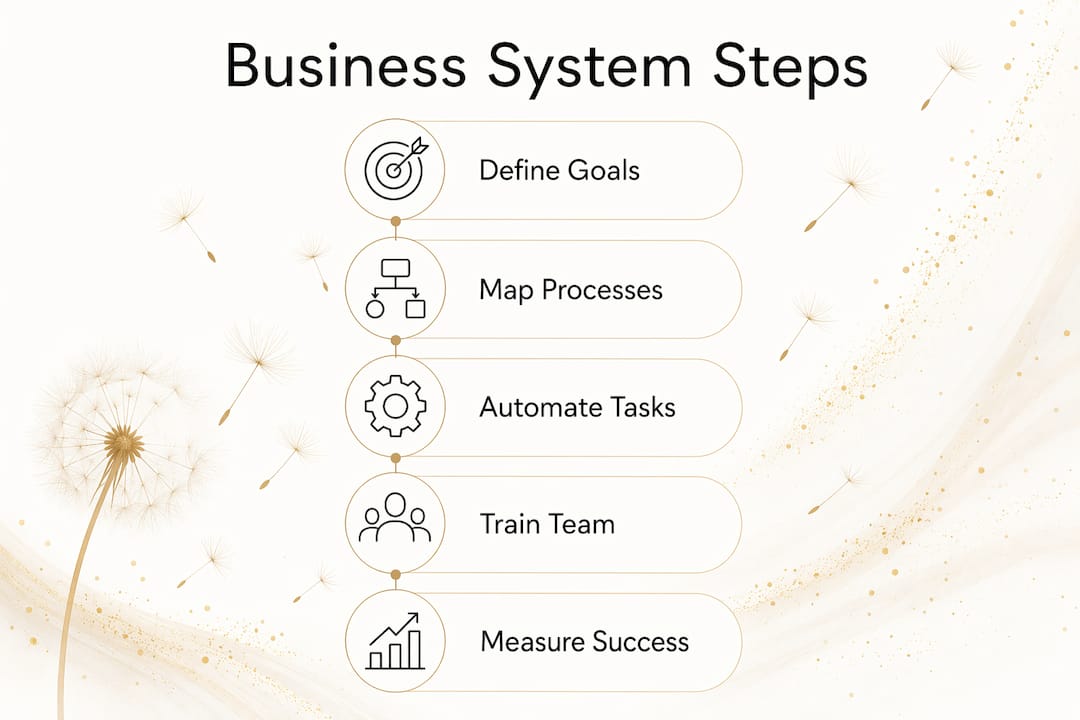
Building a system from scratch feels overwhelming until you break it into concrete steps. Here’s a practical sequence that works for most small businesses:
- Specify the result. Write a clear statement starting with “To” that defines what the system produces. Example: “To onboard every new client within five business days.”
- Map the steps. Identify every action required, in sequence. Create a simple flowchart showing dependencies.
- Write each step as an objective. Start with a verb. Example: “Send welcome email within two hours of contract signing.”
- Assign roles to positions. Attach each step to a job title, not a person’s name. This keeps the system transferable.
- Set timing. Every step needs a deadline or trigger. Open-ended tasks don’t get done consistently.
- List required resources. What tools, information, or access does each step need?
- Define your metrics. How will you know the system is working? Pick one or two measurable indicators.
- Document everything. The system doesn’t exist until it’s written down and stored where your team can find it.
- Test it. Run the system in practice. Identify gaps, missing steps, or metrics that don’t tell you anything useful. Revise before rolling out broadly.
How to document and standardize your processes
Documentation is where most systems either hold together or fall apart. The goal is clarity, not comprehensiveness. A document your team actually reads beats a thorough one nobody opens.
A few practices that make documentation stick:
- Use video alongside text. Screen recordings of someone completing a task are often clearer than written instructions and faster to produce.
- Write for the role, not the person. Assume the reader is competent but new to this specific process.
- Version control everything. Date each document and note what changed. Teams need to trust they’re reading the current version.
- Store in one place. Whether you use Notion, Google Drive with a strict folder structure, or a dedicated platform like systemHUB, consistency matters more than the tool itself.
- Keep it short. If a procedure document runs more than two pages, it probably covers too much. Break it into smaller, linked documents.
Standard operating procedures (SOPs) are the formal name for this kind of documentation. They define the steps, responsible parties, and timelines for a specific process. Well-written SOPs make it easier for people to move into new roles and fill in for each other without losing quality.
How to train your team on new systems and get real adoption
A documented system that your team doesn’t use is just a file. Adoption is the actual goal, and it requires more than sending a link to a shared folder.
- Introduce systems gradually. Roll out one process at a time. Flooding your team with new documentation creates resistance.
- Train in context. Walk through the system while doing the actual work, not in a separate meeting disconnected from the task.
- Explain the why. People follow processes more consistently when they understand what problem the system solves.
- Invite feedback early. Ask your team what’s missing or confusing within the first two weeks. They’ll catch gaps you didn’t see.
- Reinforce through repetition. Reference the documented process in team meetings, reviews, and onboarding. Normalize looking it up.
The systems champion plays a direct role here. When one person owns the training process and tracks whether the team is actually following the documented steps, adoption rates improve. AI-powered automation is also changing how training works, with tools that can generate step-by-step guides, answer process questions in real time, and flag when a team member skips a step.
How to measure whether your systems are actually working
A system without measurement is just a hope. Tracking performance over time tells you whether the system is delivering its intended result, and where it’s breaking down.
Start with these questions for each system you’ve built:
- What result was this system designed to produce?
- What metric tells you whether that result is happening?
- How often are you reviewing that metric?
- Who is responsible for acting when the metric falls short?
Common metrics vary by function. For a client onboarding system, you might track time-to-completion and client satisfaction scores. For an invoicing system, you’d watch days-to-payment and error rates. For a hiring system, time-to-hire and 90-day retention tell you a lot.
Review your systems on a set schedule. Quarterly works for most small businesses. Annual reviews catch major drift but miss the smaller breakdowns that compound over time. When a metric consistently falls short, that’s a signal to audit the process, not just push the team harder.
How to evaluate and improve your existing systems
Before building anything new, take stock of what you already have. Most businesses have informal systems in place. The goal is to make them visible, then make them better.
- Identify your critical client flow first. This is the sequence of steps that delivers your core product or service and generates most of your revenue. Systemizing this flow before anything else gives you the fastest return and proof that the approach works.
- Map each process fully. Walk through every step as it actually happens, not as you think it happens. Shadow the person doing the work.
- Assign accountability. Every process needs an owner. If nobody is responsible, nobody notices when it breaks.
- Use a centralized repository. Scattered documentation is one of the top reasons systems fail. One hub, one source of truth.
- Audit regularly. Set a calendar reminder. Systems drift when nobody checks them.
- Measure before you automate. Clean up the manual process first. Low-code and no-code tools like Zapier or Make let your team iterate quickly without heavy developer involvement, but only after the workflow is solid.
Pro Tip: Start with your critical client flow before tackling anything else. It’s the process most directly tied to revenue, and getting it documented gives your team immediate breathing room.
For small businesses building their digital infrastructure from scratch, digital systems for entrepreneurs offers a practical starting point for understanding how these pieces connect.
Key Takeaways
Effective business systems reduce owner dependence, create consistent customer experiences, and make growth possible without rebuilding from scratch at every stage.
| Point | Details |
|---|---|
| Start with the critical client flow | Systemize the process most tied to revenue first for the fastest, most measurable results. |
| Documentation requires a single hub | Scattered files across multiple tools prevent adoption; centralize everything in one place. |
| Assign a systems champion | One person accountable for auditing and updating systems prevents process drift over time. |
| Clean processes before automating | Automating a broken workflow amplifies errors; simplify the manual steps first. |
| Measure with specific metrics | Each system needs at least one measurable indicator tied directly to its intended result. |
Ready to build your digital systems?

Moderatemurmurations helps small businesses and entrepreneurs build the digital infrastructure they need to grow without the guesswork. From AI-assisted workflows to clean, fast websites and SEO-ready content, we turn scattered processes into a polished online presence that works while you focus on your business.
Launch your business online in days, not months. Or explore how we can build your digital systems from the ground up, including automation, brand copy, and everything in between.