AI Workflow Design for Professionals: 2026 Guide
AI Workflow Design for Professionals: 2026 Guide

AI workflow design is the practice of building structured, automated pipelines that connect AI models, data sources, and logic steps to handle complex creative and operational tasks. Done well, it replaces fragmented, manual processes with consistent, repeatable systems that scale without losing quality or brand voice. The tools available in 2026, from visual node-based builders to enterprise orchestration platforms, make this accessible to professionals who are not engineers.
Here is what a well-designed AI workflow typically includes:
- AI models: Large language models (LLMs) like Claude AI for text, generative visual models for image and video output, and specialized models for classification or routing
- Data retrieval layers: Connections to brand documents, SOPs, and knowledge bases that ground AI outputs in accurate, brand-aligned content
- Logic structures: If/else branches, conditional triggers, and sequential node chains that control how data flows between steps
- Integration connectors: APIs and pre-built connectors linking your workflow to external tools, databases, and services
- Human review checkpoints: Manual approval gates for sensitive or high-stakes outputs before they reach clients or go live
- Observability nodes: Logging and monitoring steps that capture inputs, outputs, and variables at each stage for debugging
The core benefit is not just speed. A well-built AI workflow delivers consistency, which is what brand-driven professionals actually need.
What are the core components of an AI workflow?
Every AI workflow, regardless of complexity, shares a common set of building blocks. Understanding these components helps you make deliberate choices about what to include and why.

AI models form the processing core. LLMs like Claude AI handle text generation, summarization, and reasoning. Generative visual models produce images or video frames. Smaller classification models handle routing decisions, deciding which path a request should take before it ever reaches a more expensive model. Cursor AI, for example, integrates LLM reasoning directly into a code editor environment, making it a practical choice for developers building or refining workflow logic.
Data tools and retrieval layers connect your workflow to real information. Rather than relying on a model’s training data alone, knowledge retrieval pulls from your brand’s own documents, style guides, and SOPs. This approach, often called retrieval-augmented generation, keeps outputs grounded and reduces the risk of hallucination.
Logic structures are what separate a workflow from a single AI prompt. These include:
- Conditional branches (if/else) that route requests based on content type, urgency, or user input
- Sequential node chains where each step’s output becomes the next step’s input
- Parallel processing paths that run multiple tasks simultaneously
- Loop structures for iterative refinement or batch processing
Visual drag-and-drop canvases make these components accessible without writing code. Platforms like Make offer thousands of pre-built integrations, letting professionals connect LLMs, data tools, and logic in minutes rather than days. IBM watsonx Orchestrate takes this further for enterprise teams, providing orchestration across multiple AI agents and business systems from a single interface.
Enterprise-grade platforms also add versioning and rollback capabilities, so teams can A/B test different AI configurations and revert to a previous version if a model update breaks editorial alignment. This kind of version control is standard practice in mature workflow environments.
How do you build and deploy an AI workflow step by step?
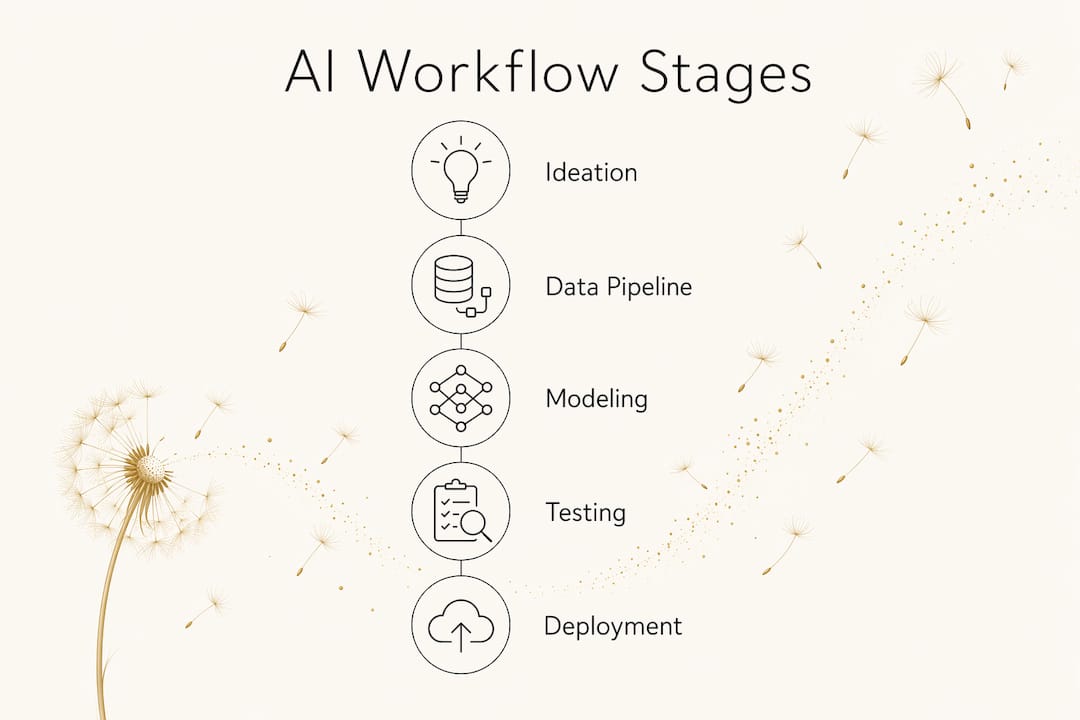
The ML development lifecycle follows a clear sequence: ideation and planning, data pipeline creation, modeling and logic construction, then deployment and monitoring. What surprises most professionals is that modeling is often the smallest effort. Data preparation and infrastructure take far more time.

Stage 1: Ideation and outcome mapping. Start by defining what the workflow must produce, not how it will work. Write down the desired output, the acceptable quality threshold, and the edge cases that would break the result. This outcome map becomes your test criteria later.
Stage 2: Data pipeline creation. Identify every data source the workflow needs: brand documents, client briefs, product catalogs, or external APIs. Build the retrieval and formatting logic before touching any AI model. A workflow with clean, well-structured inputs performs far better than one with a sophisticated model and messy data.
Stage 3: Modeling and logic construction. Start simple. Build a minimal viable workflow with one or two nodes, test it against real inputs, and confirm the output meets your criteria. Then add complexity incrementally. Iterating from simple deterministic steps to more sophisticated LLM reasoning nodes keeps the workflow debuggable at every stage.
Stage 4: Testing and validation. Run the workflow against a set of known inputs with expected outputs. Add observability nodes that log what each step receives and produces. This is where you catch logic errors, prompt drift, and edge cases before they reach production.
Stage 5: Deployment and monitoring. Deploy to a staging environment first. Monitor outputs for quality, latency, and cost. Set up alerts for failure states or unexpected outputs.
A practical summary of these stages:
- Map outcomes before touching any tool
- Build data pipelines before building model logic
- Start with the simplest possible workflow and iterate
- Test with real inputs, not synthetic ones
- Monitor continuously after deployment, not just at launch
Pro Tip: Build your first workflow around a task you already do manually. You know what good output looks like, which makes testing and iteration far faster than starting with a novel use case.
How AI is changing creative and operational workflows
AI is not replacing creative judgment. It is handling the repetitive, structured parts of creative work so professionals can focus on decisions that require taste and context. The shift is most visible in two areas: content production pipelines and operational process automation.
In creative settings, chained AI workflows now handle tasks like generating a first-draft image from a brief, running it through a style-consistency check, then producing three copy variants matched to that visual. IBM watsonx Orchestrate supports this kind of multi-agent coordination, where specialized agents handle discrete tasks and pass results to the next agent in the chain. Claude AI fits naturally into content-heavy workflows, particularly where tone, nuance, and editorial voice matter.
Operational workflows look different but follow the same logic. IT incident response, document classification, and client onboarding processes all benefit from combining deterministic logic (rule-based routing) with generative AI (drafting responses or summaries). The deterministic layer handles what can be predicted; the generative layer handles what requires language.
Benefits professionals consistently report from well-designed AI workflows:
- Faster prototyping, with first drafts produced in minutes rather than hours
- Brand consistency across high-volume output, because the workflow enforces style rules at every step
- Reduced manual review burden when human checkpoints are placed strategically rather than at every output
- Scalable automation that handles volume spikes without adding headcount
Pro Tip: Use a model cascade approach: route simple, repetitive tasks to a lightweight model first, and only escalate to a powerful LLM when the task genuinely requires it. This cuts costs and keeps response times fast for high-volume workflows.
The model cascade strategy, as explained by AI researcher Chip Huyen, reserves expensive models for high-value decisions while cheaper models handle filtering and routing. For professionals running client-facing workflows, this balance between cost and quality is often what determines whether a workflow is sustainable at scale.
Expert best practices and common pitfalls to avoid
The most common mistake in AI workflow design is starting with the AI model instead of the outcome. Professionals who begin by selecting a model and building around it often end up with workflows that are hard to debug, expensive to run, and inconsistent in output. The better approach is to map outcomes first, then choose the simplest technology that can deliver them.
Ground your workflow in real knowledge. Connecting your workflow to brand documents, style guides, and SOPs is not optional if you care about output quality. Grounding AI outputs in company-specific knowledge reduces hallucination and keeps the editorial voice consistent across every output the workflow produces.
Use human-in-the-loop checkpoints deliberately. Human oversight is not a sign that your workflow is incomplete. For sensitive outputs, client-facing content, or anything that carries legal or reputational risk, a manual review step before delivery protects quality without slowing the overall process significantly.
Build observability in from the start. Observability nodes that log inputs, variables, and outputs at each step make debugging tractable. Without them, tracing an error through a multi-node workflow is guesswork. Add logging at every step where a model or logic branch could produce an unexpected result.
Common pitfalls to watch for:
- Using a powerful LLM for tasks a simple classifier could handle, inflating cost and latency
- Skipping data pipeline quality checks, which causes model outputs to degrade unpredictably
- Building too many nodes before testing, making it impossible to isolate where errors originate
- Neglecting version control, so a model update silently changes output quality with no rollback path
At Moderatemurmurations, we approach workflow design the same way we approach website builds: start with what the output needs to accomplish, reduce friction at every step, and build in checkpoints that keep quality consistent as volume grows.
How to connect AI workflows to your existing systems
Integration is where many AI workflow projects stall. The workflow logic works in isolation, but connecting it to live business systems, CRMs, content management platforms, or data warehouses introduces complexity that requires deliberate planning.
The most practical starting point is an API-first approach. Most modern business tools expose APIs that allow external systems to read and write data. Platforms like Microsoft Power Automate offer more than 1,400 prebuilt connectors for services including Dynamics 365, SAP, and Salesforce, which means many integrations require configuration rather than custom code.
For teams working with non-API systems, robotic process automation (RPA) handles desktop applications and legacy software by mimicking user interactions. This is slower and more fragile than API integration, but it covers systems that have no other access point.
Key integration strategies worth building into your workflow from the start:
- Trigger design: Define what event starts the workflow. Triggers can be manual, scheduled, or event-driven (a new form submission, a file upload, a CRM status change).
- Data normalization: Standardize data formats before they enter the AI processing layer. Inconsistent inputs produce inconsistent outputs.
- Connector authentication: Manage API keys and OAuth tokens centrally, not embedded in individual workflow nodes. This makes credential rotation manageable.
- Error handling: Build explicit failure paths for every integration point. When an external API is unavailable, the workflow should fail gracefully and alert the right person.
For professionals building client-facing systems, the role of automation in scaling comes down to how well your integrations handle edge cases. A workflow that breaks silently is worse than one that fails loudly.
How do you evaluate and validate an AI workflow?
Validation is not a one-time event at launch. It is an ongoing process that confirms the workflow continues to produce acceptable outputs as models, data, and business requirements change.
Start with a baseline evaluation before deployment. Run the workflow against a set of test cases with known expected outputs. Score each output against your quality criteria, whether that is accuracy, tone alignment, format compliance, or factual correctness. This baseline becomes your reference point for every future change.
A/B testing is the most reliable method for comparing workflow versions. Run two configurations in parallel on the same inputs and measure which produces better outputs against your criteria. Enterprise platforms that include versioning, like Dify and Tines, make this straightforward by allowing teams to deploy and compare workflow versions without disrupting production.
Continuous monitoring after deployment catches drift, which is the gradual degradation of output quality that happens when model behavior shifts or input data changes. Set up automated checks that flag outputs falling below quality thresholds, and review flagged outputs manually before they reach clients.
Practical validation methods to apply:
- Unit testing per node: Test each workflow node in isolation before testing the full chain
- End-to-end testing: Run complete workflows with real inputs and review full outputs
- Regression testing: After any change, re-run the baseline test set to confirm quality has not dropped
- Human review sampling: Randomly sample a percentage of live outputs for manual quality review on an ongoing basis
For professionals using Cursor AI in development workflows, node-level testing during the build phase catches logic errors early, before they compound through downstream steps.
Which tools and platforms support AI workflow design?
The right platform depends on your technical comfort level, the complexity of your workflow, and whether you need enterprise governance or a fast, flexible build environment.
IBM watsonx Orchestrate is built for enterprise teams that need to coordinate multiple AI agents across business systems. It handles multi-step orchestration, integrates with existing enterprise software, and provides governance controls that matter in regulated industries.
Claude AI by Anthropic excels in workflows where language quality, nuance, and instruction-following are priorities. It fits naturally into content production, document analysis, and client communication workflows where tone and accuracy both matter.
Cursor AI integrates LLM assistance directly into a code editor, making it the practical choice for developers who are building or iterating on workflow logic. It reduces the friction between designing a workflow and writing the code that implements it.
Figma serves a different but equally important role: prototyping and mapping workflow structure visually before building it. Design teams use Figma to diagram node connections, user touchpoints, and decision branches, creating a shared reference that developers and stakeholders can review together before any code is written.
Perplexity AI functions as a real-time research and retrieval layer within workflows that require current information. Rather than relying on a model’s training cutoff, Perplexity retrieves and synthesizes live web content, making it useful for workflows that need up-to-date data as part of their processing.
For no-code and low-code builders, website automation tools built on platforms like Make give professionals a fast path to connecting AI models, data sources, and business tools without writing custom integrations. The AI tools improving customer experience available through these platforms now cover use cases from automated client intake to personalized content delivery.
Microsoft Copilot Studio offers a visual workflow canvas with native AI actions, agent handoffs, and node-level testing, making it a strong option for teams already working within the Microsoft ecosystem.
Key Takeaways
Effective AI workflow design starts with outcome mapping and builds complexity incrementally, grounding every AI step in real data and validated logic before scaling.
| Point | Details |
|---|---|
| Start with outcomes, not models | Define what the workflow must produce before selecting any AI tool or platform. |
| Ground outputs in real knowledge | Connect workflows to brand documents and SOPs to reduce hallucination and maintain editorial voice. |
| Build observability from the start | Log inputs and outputs at every node so errors are traceable, not guesswork. |
| Use human checkpoints deliberately | Place manual review steps at high-stakes outputs to protect quality without slowing the full process. |
| Match model complexity to task value | Use lightweight models for routing and filtering; reserve powerful LLMs for tasks that genuinely require them. |
Ready to build your AI workflow?

At Moderatemurmurations, we design and build AI-assisted digital systems for professionals, creators, and service providers who want reliable, brand-consistent automation without the complexity of managing it alone. Whether you need a content production pipeline, a client intake workflow, or a full digital infrastructure, we build it fast and clean.
Launch your business online with a system that works from day one, or explore what we build to find the right fit for your workflow needs.