Protect Revenue: Small Business Website Maintenance Plans $50–$500
Protect Revenue: Small Business Website Maintenance Plans $50–$500

A website maintenance plan is a standing set of tasks and guarantees that keep your site secure, backed up, and running fast. At minimum, it must guarantee tested backups, active security monitoring, and uptime tracking. For a typical small-business brochure site, a solid plan runs about $50 to $500 a month, depending on complexity and how fast you need help when something breaks.
TL;DR:
- A website maintenance plan should include tested backups, security monitoring, and uptime tracking, optimized for the site’s complexity and data sensitivity.
- Monthly costs for small-business plans range from $50 to $500, depending on features like staging, performance audits, and response SLAs.
- Automated tools for uptime, backups, security scans, staging, and performance testing are essential for consistent, reliable maintenance.
- Regular testing of backups, staged updates, and clear ownership of maintenance tasks prevent common failures such as untested restores and unpatched vulnerabilities.
- Small businesses should prioritize monthly maintenance to protect revenue, reputation, and SEO, especially if processing payments or handling sensitive data.
Table of Contents
- What Is a Website Maintenance Plan, and Who Actually Needs One?
- What Should a Website Maintenance Checklist Include?
- What Does Website Maintenance Cost Each Month?
- Should You Handle Maintenance Yourself or Hire It Out?
- What Do Sample Maintenance Plans Look Like at Each Tier?
- What Tools Keep a Maintenance Plan Running Smoothly?
- How Do You Know Your Maintenance Plan Is Actually Working?
- How Moderatemurmurations Approaches Ongoing Website Care
- The Mistakes We See Most Often in Small-Business Maintenance
- Sources
- FAQ
What Is a Website Maintenance Plan, and Who Actually Needs One?
A website maintenance plan is an ongoing agreement, whether with an agency, a freelancer, or your own internal process, that keeps your site secure, fast, backed up, and current. It rests on four pillars: security (patches, scans, monitoring), performance (speed and uptime), backups with tested restores, and content health (broken links, outdated pages, stale plugins).
We think of it less as an insurance policy and more as basic upkeep, the digital version of changing your car’s oil before the engine seizes. If you skip it, the costs show up later as downtime, lost leads, or a hacked site that Google quietly de-indexes.
The business case is straightforward. A site that stays up protects revenue. A fast site keeps visitors from bouncing, and speed is a direct SEO signal Google factors into rankings. A secure site protects your reputation and, for regulated industries, keeps you compliant with data-handling expectations.
Needs scale with complexity. A five-page brochure site for a local plumber needs far less than an e-commerce store processing payments daily, which needs far less than a custom-built platform with third-party integrations. Match the plan to what your site actually does, not to what sounds impressive on a proposal.
What Should a Website Maintenance Checklist Include?
The most reliable maintenance programs organize tasks by frequency rather than by category, because that’s how the work actually gets scheduled. A recommended cadence groups daily monitoring, weekly scans, monthly updates, and quarterly or annual audits into a rhythm you can actually follow.
Daily or real-time tasks catch problems before customers do. Uptime monitoring alerts you the moment a site goes down. E-commerce sites need transactional backups running continuously, since losing even a few hours of order data can mean real refund headaches.
Weekly tasks are lighter but still matter. Security scans flag malware or suspicious file changes early. A quick review of server logs and error reports often surfaces a broken integration before a customer complains about it.
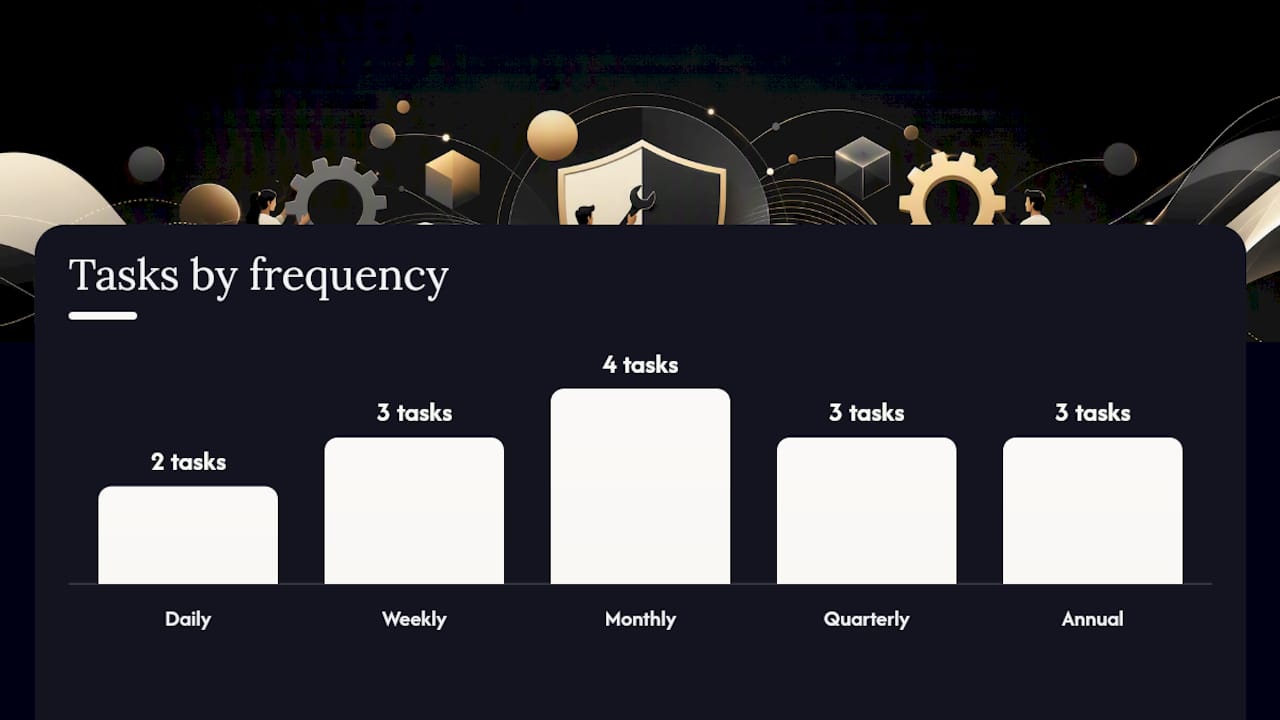
Monthly tasks carry the most weight. Plugin, theme, and core software updates should always run on a staging copy first, never straight to production. Performance testing and a broken-link sweep round out the month, along with a full backup restore test, following the 3-2-1 backup rule: three copies, on two different media, with one stored offsite.
Quarterly and annual tasks cover the deeper checkups: accessibility audits against W3C WCAG standards, full security assessments against the OWASP Top Ten vulnerabilities, domain and SSL renewals, and a content audit to retire outdated pages.
| Frequency | Core tasks |
|---|---|
| Daily | Uptime checks, real-time transactional backups (e-commerce) |
| Weekly | Security scans, log review, quick functionality checks |
| Monthly | Staged plugin/theme/core updates, performance tests, backup restore test, broken-link check |
| Quarterly | Accessibility review, SEO content audit, deeper security scan |
| Annual | Full security assessment, domain/SSL renewal, comprehensive content and sitemap review |
- Copy this table into your calendar or ticketing system and assign an owner to each row.
- Anything touching live code goes to staging first. No exceptions.
- Test every backup by actually restoring it. An untested backup is a guess, not a guarantee.
What Does Website Maintenance Cost Each Month?
Pricing usually follows one of four models: a flat monthly subscription, a tiered package with defined scope, hourly or pay-as-you-go work, or a managed hosting bundle that folds maintenance into your hosting fee.
Small-business plans typically fall between $50 and $500 a month, with enterprise or heavily customized platforms often running well past that. Here’s roughly how it breaks down:
- DIY (near $0 to $50/month): you handle updates yourself, paying only for backup storage, security plugins, or basic hosting extras.
- Basic plans ($50 to $150/month): core updates, backups, and uptime monitoring on a simple brochure or blog site.
- Pro plans ($150 to $500/month): staging environments, monthly performance and security audits, faster response times, and reporting.
- Enterprise ($500+/month): custom code, complex integrations, e-commerce transaction volume, and strict SLA response windows.
What actually drives the price up isn’t the number of pages. It’s how much custom code you’re running, whether you’re processing payments, how fast you need a response when something breaks, and whether you’re subject to compliance requirements like accessibility standards or payment-data rules. A five-page static site and a five-page site running three third-party APIs are not the same job, even though they look identical to a visitor.
Should You Handle Maintenance Yourself or Hire It Out?
DIY maintenance saves cash but costs time, and it assumes you’ll actually notice when something breaks. Hiring a freelancer or agency costs more but buys you a guaranteed response window and someone whose job it is to catch problems before your customers do.
Run through this before deciding:
- How complex is the site? A static brochure page is a different animal than a custom-built platform with integrations.
- Does downtime cost you money directly? If your site processes orders or bookings, every hour offline has a dollar value attached.
- Are you under any compliance requirements? Accessibility standards, payment data rules, or industry-specific regulations raise the stakes on getting maintenance right.
- Do you have critical third-party integrations? Payment processors, booking systems, and CRMs that break silently need proactive monitoring, not a monthly glance.
- What’s your real budget, including your own time? DIY isn’t free. It’s paid in hours you’re not spending on the business itself.
If you’re evaluating a provider, ask directly: What’s your response SLA for a down site? Do you test backups, or just take them? Do updates go to staging first, or straight to production?
Pro Tip: If you can’t answer “when was our last backup successfully restored” without checking, that’s your sign to hire this out. A backup nobody has tested is a false sense of security, not a safety net.
What Do Sample Maintenance Plans Look Like at Each Tier?
Seeing a real package laid out tends to clarify things faster than another paragraph of theory. Packaging maintenance into predictable tiered subscriptions with clear scope is also what makes budgeting painless instead of a guessing game every renewal.
Entry tier: covers the non-negotiables. Weekly backups, monthly security scans, uptime monitoring, and core software updates. No staging environment, and updates go live directly, which carries some risk but keeps cost low for a low-traffic brochure site.
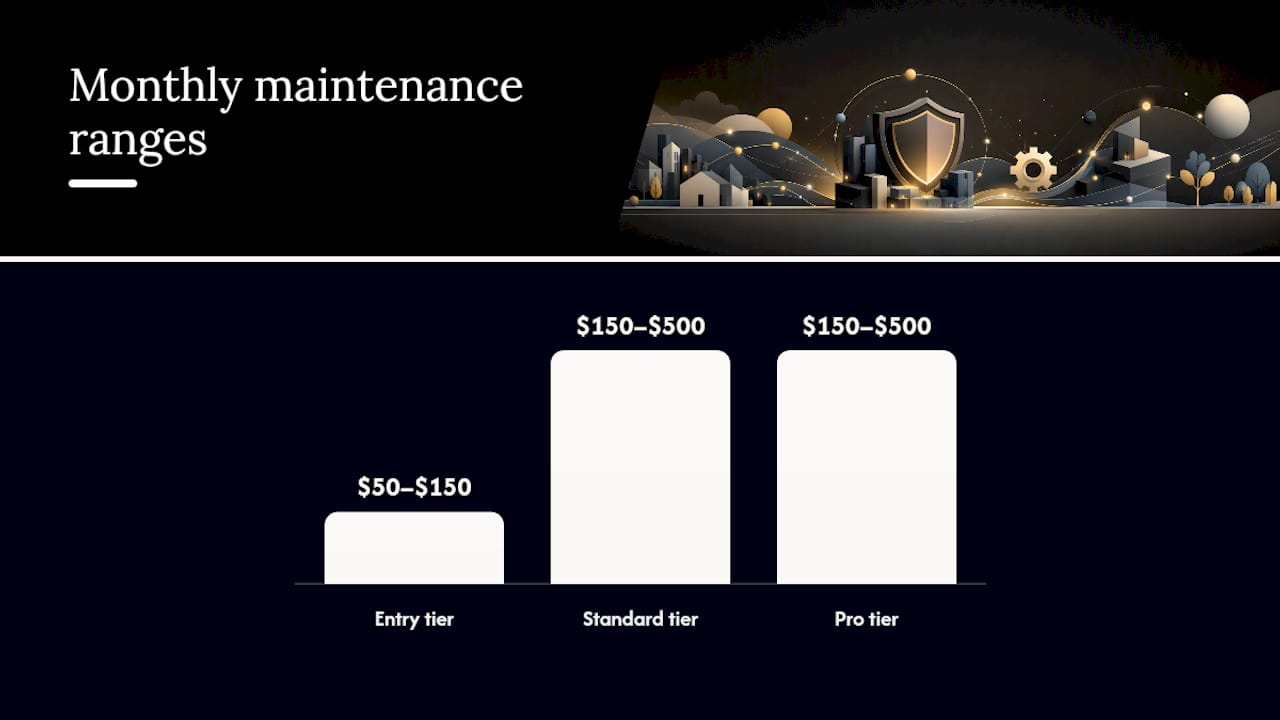
Standard tier: the balanced option most small businesses land on. Staging-based updates, monthly performance testing, a monthly report covering uptime and backup status, and a faster response window if something breaks.
Pro tier: built for e-commerce or complex platforms. Real-time transactional backups, 24/7 uptime monitoring, same-day or faster SLA response, and quarterly security assessments layered on top of the standard tasks.
| Tier | Backup frequency | Update process | Monitoring | Typical monthly range |
|---|---|---|---|---|
| Entry | Weekly | Direct to live site | Basic uptime alerts | $50–$150 |
| Standard | Daily | Staging, then live | Uptime plus monthly performance test | $150–$500 |
| Pro | Real-time | Staging, tested, scheduled release | 24/7 monitoring, faster SLA | $150–$500 |
Adapt any of these by adding or removing the pieces your site actually uses. An informational site with no forms doesn’t need real-time backups. A donation page or online store shouldn’t settle for weekly ones.
What Tools Keep a Maintenance Plan Running Smoothly?
A good plan leans on a handful of tool categories rather than one all-in-one platform: uptime monitors that ping your site every few minutes, automated backup systems, security scanners that check against known vulnerability lists, a staging environment separate from your live site, and performance testing tools tracking load times and Core Web Vitals.
Automation is what keeps recurring costs down. Scheduled backups, automatic dependency updates on staging, and cron-based health checks all replace hours of manual labor with a system that runs itself and only flags a human when something actually needs attention.
- Uptime monitoring: catches downtime within minutes, not hours.
- Automated backups: removes the “did we remember” risk entirely.
- Security scanners: check for the vulnerability patterns in the OWASP Top Ten.
- Staging environments: let you test updates without risking the live site.
- Performance testing: benchmarks load times against Core Web Vitals targets.
A useful monthly report boils this down to four things: uptime percentage, backup test status, what got updated, and a short prioritized list of what needs attention next.
How Do You Know Your Maintenance Plan Is Actually Working?
Track a small set of numbers instead of a vague sense that things are “fine.” Uptime percentage, mean time to repair (MTTR), backup restore success rate, Core Web Vitals scores, and monthly incident counts tell you almost everything you need to know.
Statistic to watch: mobile devices account for roughly half of all web traffic, so a performance report that only checks desktop speed is measuring half a story.
For ROI, a simple formula works: estimate your average revenue per hour of traffic, multiply by hours of downtime prevented or by the conversion lift from a faster site, and compare that to your monthly maintenance spend. Even a rough version of this math usually makes the case for itself.
Review reports monthly, and do a deeper strategic check quarterly, when you reassess whether your tier still matches your site’s needs.
How Moderatemurmurations Approaches Ongoing Website Care
We build maintenance into projects the same way we build the sites themselves: with a staging policy that keeps every update off the live site until it’s tested, a monthly reporting cadence that covers uptime and backup status in plain language, and a clear priority list instead of a wall of technical jargon.
This approach comes from experience doing this work directly for small businesses, creators, and service providers who need their site to just work without needing to think about it. That includes the technical SEO habits that keep a site’s structure clean and the accessibility basics that quietly protect both your reputation and your reach. If you’re standing up a new site, our launch checklist maps closely to the same maintenance habits that keep it healthy afterward.
The Mistakes We See Most Often in Small-Business Maintenance
Three mistakes show up constantly: deferred updates that pile up until one breaks the site, backups nobody ever tried restoring, and pushing changes straight to a live site with no staging copy as a safety net. The fix is boring but effective: automate backups, block off one monthly window for updates, and remove plugins you’re not actively using. Escalate to a professional the moment your site handles payments, sensitive data, or revenue you can’t afford to lose.
— Christopher
Sources
For readers who want to verify the standards behind this guide, a few sources are worth bookmarking. CISA’s cyber hygiene tips cover the patching and credential basics every small site should follow. The OWASP Top Ten is the standard reference for the vulnerabilities security scans should catch. The W3C’s WCAG guidelines define what an accessibility audit actually checks for. And the HTTP Archive’s Web Almanac provides the performance benchmarks behind realistic Core Web Vitals targets, alongside a practical mobile optimization checklist worth running your site against.
If you’d rather hand this off entirely, Moderatemurmurations builds and maintains websites for small businesses and service providers who want their site handled without managing the checklist themselves. A free consultation is the fastest way to find out what your site actually needs.
- What is a website maintenance plan? — Elementor
- How much does it cost to maintain a website in 2026? — GoDaddy
- OWASP Top Ten
FAQ
How Much Does It Cost to Pay Someone to Maintain a Website?
Most small businesses pay between $50 and $500 a month for professional maintenance, with the exact figure depending on site complexity, update frequency, and how fast you need issue response.
What Should a Maintenance Plan Include?
At minimum, a plan should guarantee tested backups, regular security scans and updates, uptime monitoring, and periodic performance and content checks, ideally organized by frequency rather than left to chance.
How Much Does a Website Maintenance Cost Overall?
Beyond the monthly retainer, factor in occasional costs like domain renewal, SSL certificates, and premium plugin licenses, though managed hosting bundles often fold these into one predictable fee.
Do Websites Need Monthly Maintenance?
Yes. Software updates, security patches, and backup tests need to happen at least monthly to keep a site secure and functional, with some tasks like uptime monitoring running continuously instead.