Website Migration Checklist for SEO: >95% Redirect Accuracy
Website Migration Checklist for SEO: >95% Redirect Accuracy

Yes, you can migrate a website without losing your search rankings, but only if you treat SEO as a project requirement, not an afterthought. That means benchmarking your current performance, building a complete 1:1 redirect map, testing staging for parity with your live site, and monitoring closely for the first 30 to 90 days after launch. Expect some ranking wobble in the first two weeks.
TL;DR:
- Properly mapping each URL to its most relevant new destination prevents unnecessary ranking loss and avoids soft 404 errors caused by redirecting to the homepage.
- Conducting thorough pre-migration benchmarking, URL inventory, and backlink analysis ensures accurate redirects and helps identify high-value pages that require the most attention.
- Running parity checks on staging, including verifying internal links, structured data, and content volume, reduces the risk of losing SEO signals during the live launch.
- Maintaining redirects for at least 180 days, preferably a full year, allows search engines to consolidate signals, especially crucial after domain or site structure changes.
- Avoiding bundling multiple changes in a single migration, such as redesigns and domain moves, simplifies diagnosis and recovery if ranking drops occur.
Table of Contents
- What Counts as a Website Migration in SEO Terms?
- Pre-Migration Checklist: Benchmarks, URL Inventory, and Scope
- Staging Parity Checks: Catching Losses Before Launch
- How Do You Build a Redirect Map That Actually Works?
- Launch Day Checklist: Catching Fatal Errors Fast
- Post-Launch Monitoring: What to Watch and When to Worry
- Common Website Migration Mistakes That Tank Rankings
- What We’ve Learned Guiding Clients Through Migrations
- Where to Verify This Yourself
- Sources
What Counts as a Website Migration in SEO Terms?
A website migration is any change significant enough to alter how search engines crawl, index, or evaluate your site’s URLs, content, or structure. That’s a broad definition on purpose because the risk profile shifts depending on what’s actually moving.
Some migrations touch a handful of technical settings. Others rebuild the entire site from scratch. Knowing which type you’re dealing with tells you how much redirect work, testing, and monitoring you’re in for.
The common categories:
- Domain changes. Moving from one domain to another (or adding/removing “www”) requires Google’s Change of Address tool and a full URL-by-URL redirect map.
- CMS or platform swaps. Moving from one content management system to another (WordPress to a headless setup, for example) often changes URL structures, templates, and how metadata gets generated.
- Redesigns. A visual overhaul that keeps the same URLs and domain carries lower technical risk, but it’s the most common source of accidental content loss. Developers rebuild templates and quietly drop H1s, internal links, or schema markup in the process.
- URL structure updates. Changing slugs, folder hierarchy, or removing/adding trailing slashes touches every internal link and requires redirects even without a domain or CMS change.
- Hosting or protocol changes. Moving servers or switching from HTTP to HTTPS can affect page speed, Core Web Vitals, and crawl behavior even when nothing about the content changes.
- Site consolidations. Merging multiple domains or subdomains into one property combines backlink profiles and requires careful redirect mapping to avoid diluting authority.
If you can, separate these changes rather than bundling them. A redesign that happens at the same time as a domain move makes it nearly impossible to diagnose which change caused a ranking drop if something goes wrong. Search Engine Land’s migration framework makes this point repeatedly: isolate variables so recovery work has a clear target.
Pre-Migration Checklist: Benchmarks, URL Inventory, and Scope
Everything that happens after launch depends on what you document before it. Skip this phase and you’ll spend weeks guessing whether a ranking drop is a redirect error, a content loss, or normal fluctuation.
Start building your migration source-of-truth two to four weeks before the planned launch date. Migration guides consistently recommend freezing your baseline in this window, since it gives you a stable comparison point once traffic starts moving. Here’s the order that works:
- Export Google Search Console data. Pull queries, landing pages, clicks, impressions, and average position for at least the trailing three months. This becomes your “what did we have” reference.
- Export GA4 baselines. Session counts, conversion events, and top landing pages by channel. Screenshot or export dashboards so you have a dated snapshot, not just live data that will change.
- Run a full site crawl. Use a crawler that captures every URL, title tag, H1, canonical tag, and status code across the entire site. Tools like Screaming Frog or Sitebulb are standard for this.
- Rank pages by value. Cross-reference traffic, conversions, and backlink count to identify your highest-value URLs. These get priority attention in the redirect map. A blog post with 40 monthly visits gets less scrutiny than a service page converting 5% of its traffic.
- Audit backlinks. Pull your backlink profile from Search Console or a backlink tool and flag which referring domains point to pages that are changing URLs. For high-authority links, you may need to contact the linking site directly if a redirect alone doesn’t fully preserve context.
- Document scope and roles. Write down what’s changing, what isn’t, who owns each task, what the rollback trigger looks like, and which metrics define success 30 and 90 days out.
That last step gets skipped constantly, and it’s usually why migrations turn into finger-pointing exercises. If nobody agreed in advance on what “recovered” looks like, or who has authority to roll back a broken launch, you’ll waste your first 48 hours arguing instead of fixing.
Pro Tip: Keep your baseline crawl export as a static file, not a live dashboard link. When something looks off two weeks post-launch, you need to compare against exactly what existed before, not a report that’s since updated itself.
Backlink work deserves extra attention here. A Search Engine Land analysis of migration risk points out that redirecting a backlinked URL to your homepage instead of its closest equivalent gets treated by Google as something close to a soft 404. That link’s authority doesn’t transfer cleanly. If a page has meaningful inbound links, its 1:1 mapping target matters more, not less.
For service-based businesses especially, this pre-migration phase is where SEO foundations either get baked in or get lost. Our own breakdown of SEO for service providers covers why this groundwork has to happen before a single template gets rebuilt, not after.
Scope documentation should also name your rollback criteria explicitly. Decide that answer while everyone’s calm, not while a client is calling about lost leads.
Staging Parity Checks: Catching Losses Before Launch
Staging is where migrations succeed or fail quietly. Nobody notices a missing H1 tag or a stripped schema markup block until rankings drop weeks later, and by then you’re troubleshooting blind.
Temporarily allow crawler access to staging (password-protect it from public search, but let your own crawl tool in) and run a full comparison against your pre-migration baseline. You’re checking:
- H1 and title tag consistency. Every priority page should have the same core H1 and title intent as its live equivalent, even if wording is refreshed.
- Internal link structure. New templates frequently drop contextual internal links that used to pass authority between related pages.
- Structured data. Verify every schema type you had before still exists using Schema.org’s validator tool. Redesigns are notorious for losing review, FAQ, or product schema during template rebuilds.
- Content volume. Word count and body content shouldn’t shrink dramatically unless that was an intentional editorial decision.
- Rendering behavior. Confirm whether content is server-side rendered or depends on client-side JavaScript, and test how each renders on mobile.
That last point matters more than most teams realize. If your new site leans on JavaScript frameworks like React or Vue for content rendering, verify that Googlebot can actually see the content without executing heavy client-side scripts, since rendering delays or failures can leave critical text invisible to crawlers even though it displays fine in a browser.
Search Engine Land’s migration guidance treats this parity check as the single most important gate before launch, precisely because developers optimizing for visual polish or functionality routinely strip out SEO-critical elements without realizing it. Nobody breaks your schema markup on purpose. It just falls out of scope during a rebuild focused on other priorities.
Run Core Web Vitals checks on staging too. A migration that quietly tanks page speed can offset every other SEO gain you’re hoping to capture from a redesign.
Finally, confirm your analytics setup works on staging before it works in production. Verify GTM containers fire correctly, GA4 events track as expected, and if you’re using GSC’s URL inspection tool, that your verification method will transfer cleanly to the new environment. Fixing tracking gaps after launch means flying blind during the exact window you need visibility most.
How Do You Build a Redirect Map That Actually Works?
Your redirect map is the single highest-leverage document in the entire migration. Get it right and link equity flows through cleanly. Get it wrong and you’ll spend months clawing back rankings that a few hours of careful mapping would have preserved.
The process, step by step:
- Export every old URL. Pull this from your crawl data, not just your sitemap, since sitemaps often miss orphaned pages that still carry traffic or backlinks.
- Map each URL to its closest equivalent. If a page has a direct replacement on the new site, redirect to it. If a page is being removed entirely with no equivalent, serve a 410 (Gone) status instead of forcing a redirect that doesn’t make sense.
- Implement server-side 301 or 308 redirects. These pass the clearest signal to search engines about a permanent move. Client-side redirects (JavaScript-based or meta refresh) are slower and less reliable for crawlers.
- Avoid redirect chains. A URL that redirects to another redirect, which redirects again, wastes crawl budget and can dilute the signal. Map directly to the final destination.
- Never blanket-redirect everything to the homepage. This is the single most common migration error, and it’s treated by Google roughly like a soft 404. Every redirected URL needs a genuine closest-match destination.
- Update internal links on staging. Don’t rely on redirects to catch internal links you forgot to update. Point internal links directly to new URLs before launch so redirects aren’t doing unnecessary work.
- Update canonical tags. Confirm every page’s canonical tag points to its own new URL, not a legacy staging or pre-migration address.
Pro Tip: Build your redirect map in a spreadsheet with three columns: old URL, new URL, and status code. Before launch, have someone who wasn’t involved in building it spot-check 50 random rows against the live staging environment. Fresh eyes catch mapping errors the builder stopped seeing after row 200.
Plan for how long these redirects need to stay live. Google’s own guidance on site moves recommends maintaining redirects for at least 180 days while its systems consolidate signals between old and new URLs, and most practitioners extend that further. A more conservative standard, and the one worth building into your contracts and documentation, is keeping redirects live for a minimum of 12 months. Retain ownership of your old domain for that entire window even if you’ve stopped actively using it, since letting an old domain’s registration lapse can sever redirects that were still consolidating authority.
Launch Day Checklist: Catching Fatal Errors Fast
Launch day is a narrow window where small mistakes compound quickly. Work through this checklist within the first few hours of going live, not the first few days.
- Remove noindex tags and staging blocks. Check both the meta robots tag and your robots.txt file. Staging environments almost always block crawlers, and that block getting carried into production silently is one of the most common (and most damaging) migration mistakes.
- Spot-check high-value redirects. Pull 20 to 30 of your highest-traffic old URLs and confirm each one returns a live 301 or 308 to the correct new page, not a 404 or a redirect loop.
- Verify canonical tags and status codes. Every new page should return a 200 status with a canonical tag pointing to itself.
- Submit your updated XML sitemap. Push the new sitemap through Google Search Console immediately. For domain-level moves, use Search Console’s Change of Address tool, which requires verified ownership of both the old and new properties.
- Confirm analytics and conversion tracking fire correctly. Test GTM triggers, GA4 events, and any conversion goals on the live site before you consider launch complete.
Our own website launch checklist for small businesses covers general QA steps worth running alongside this migration-specific list, particularly around form functionality and mobile display.
Treat the first few hours after launch as a verification sprint, not a celebration. The issues that surface here are almost always fixable within minutes if caught immediately, and almost always expensive if they sit for a week.
Post-Launch Monitoring: What to Watch and When to Worry
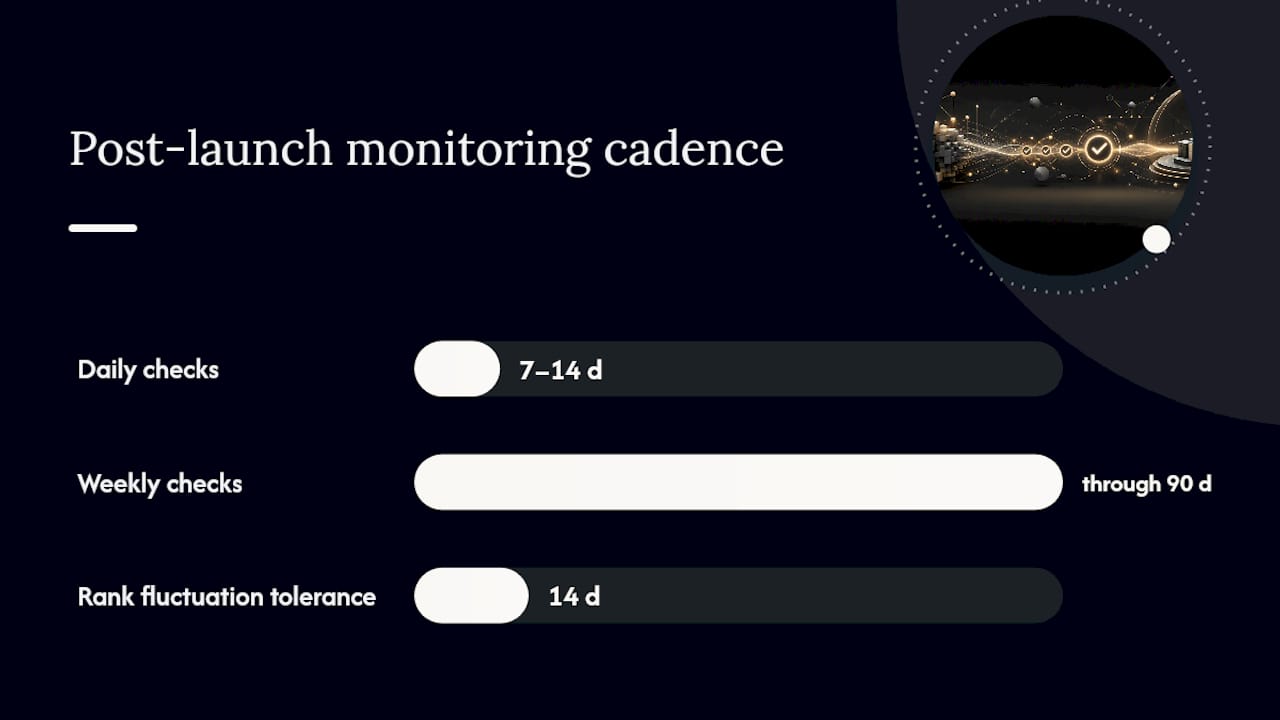
Recovery timelines vary, but the monitoring cadence shouldn’t. Check daily for the first 7 to 14 days, then shift to weekly checks through the 90-day mark.
What to watch during daily checks:
- Google Search Console coverage reports. Watch for spikes in crawl errors, 404s, or pages marked “discovered, not indexed.”
- GA4 traffic by landing page. Compare against your frozen baseline to spot which specific pages are underperforming, not just overall traffic trends.
- Rank tracking for priority keywords. Some fluctuation in the first two weeks is normal. A steep, sustained drop on your highest-value pages is not.
- Crawl logs or server logs. Confirm Googlebot is actually reaching your new URLs and not getting stuck on old paths or blocked resources.
When rankings do drop, triage in order: check whether the affected page’s redirect is actually live and correctly mapped, check whether content or internal links were lost during the rebuild, then check canonical tags and index status. Most migration-related drops trace back to one of those three causes.
If you find a redirect gap affecting a page with meaningful backlinks, don’t just fix the redirect. Reach out to the linking site directly and ask them to update the link to the new URL, since direct link updates carry more weight than a redirect chain alone for some of your highest-value referring domains.
Set expectations early with anyone watching the numbers: a short-term dip is normal, even in a well-executed migration. Recovery speed depends heavily on how fast your team fixes what monitoring uncovers, not on hoping the algorithm sorts itself out.
Common Website Migration Mistakes That Tank Rankings
Most migration disasters trace back to a small, repeatable list of errors. Watch for these specifically:
- Staging blocks carried into production. Always check robots.txt and meta robots tags immediately after launch, not the next day.
- Wildcard redirects to the homepage. Every redirected URL needs its own closest-match destination, not a lazy catch-all.
- No baseline snapshot. Without a frozen pre-launch crawl and analytics export, you can’t prove what changed or measure genuine recovery.
- Bundling unrelated changes. A domain move combined with a full redesign makes diagnosing problems nearly impossible when something breaks.
- Letting redirects expire too early. Killing redirects or dropping old domain registration before signals fully consolidate can undo months of careful work.
If you’re dealing with content that shouldn’t have survived the move at all, such as outdated pages indexed under the old structure, a service like Repvive’s URL removal support can help clear stubborn index entries faster than waiting on natural crawl cycles.
What We’ve Learned Guiding Clients Through Migrations
Migrations rarely fail because of one catastrophic mistake. They fail because of five small ones stacking up quietly, a missing canonical tag here, a dropped internal link there, until the cumulative effect looks like a mystery ranking collapse three weeks later.
The pattern we see most often with service-based businesses: a redesign focused entirely on visual polish, with SEO treated as something to “check later.” By the time anyone runs a parity comparison, half the schema markup is gone and internal linking between related service pages has quietly evaporated. Catching that during staging review, rather than after launch, is the difference between a two-hour fix and a two-month recovery.
We build parity checks and baseline benchmarking into every migration we handle, specifically because rebuilding trust with search engines takes far longer than preserving it in the first place.
— Christopher
Where to Verify This Yourself
For the technical details behind this checklist, Google’s own guidance on site moves covers the Change of Address tool directly. Semrush’s migration checklist and Search Engine Land’s migration guide both go deeper on redirect strategy and parity testing. Validate structured data with Schema.org’s official validator, and use the Wayback Machine if you need to recover content from pages that existed before the move.
If your migration involves restructuring how pages are organized, our guide to sitemap structure is worth reviewing before you submit anything new to Search Console.
Planning a migration that needs to protect existing rankings while modernizing the site itself? Moderate Murmurations builds and migrates websites with this exact checklist baked into the process, from benchmarking through post-launch monitoring, so growth doesn’t come at the cost of the visibility you’ve already earned.
Sources
- The Complete Website Migration Checklist SEO-Friendly — Semrush
- Website migrations: a plan to keep your traffic and SEO safe — Search Engine Land
- Site moves and migrations — Google Search Central (Change of Address details)
- Linkguard